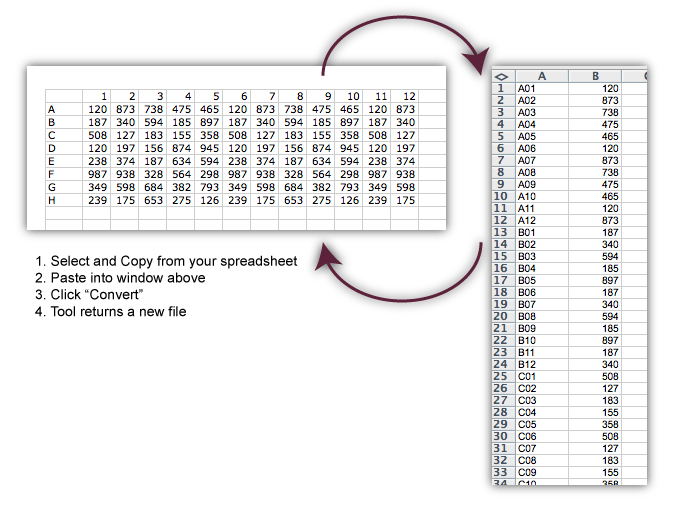
This is a simple utility page for converting between
lists of well data and data layed out in a plate grid. To
use it, you should be able to copy your spreadsheet data
directly into the text area and click the convert button.
The program should recognize whether you have given it a
plate grid to convert to a list or a list to convert to a
plate grid. It will also handle multiple conversions at
once if each set of data is separated from the one before it
by at least one blank line. Each result will go in a
separate tab of the Excel spreadsheet which is returned to
you as a result.
Please paste only the plate grid (with or without row an
column labels) or list data. Headers may confuse the
program. Please remember to leave blank lines/rows between
sets of data when pasting multiple sets. It does not matter
whether the sets are all the same type of data or different
types.
Format for well names specifies how well names
should be formatted when data in converted from a plate grid
to a list. A01 specifies that all names should
be three characters wide and a 0 should be added to the
front of the column number if the column number is less than
10 to keep the length consistent. A1 specifies
that the column number should not be zero filled and the
well name should be allowed to vary in width.
Include blank wells in lists? controls whether all
wells should be represented when a list is created from a
plate grid or cells with no data should be omitted from the
list.
Close this
window